

Simple IP control

What is Simple IP control
Simple IP Control is a simple communication protocol for controlling the monitor over a local network. It is designed for developers who are familiar with CIS (Custom Installation Services) and AV equipment control systems. The control listening port is TCP 20060 on the monitor. It uses fixed-size 24-byte data and supports many commands.
Features
Reliable TCP Communication
Commands are sent and received over TCP communication.
Simple and Efficient Command Format
SSIP (BRAVIA Professional Displays proprietary protocol) delivers speed and stability.
Designed for Professional Engineers
Flexible and expandable to meet the needs of CIS and commercial AV equipment control systems.
Preparation and Implementation Guide
preparation
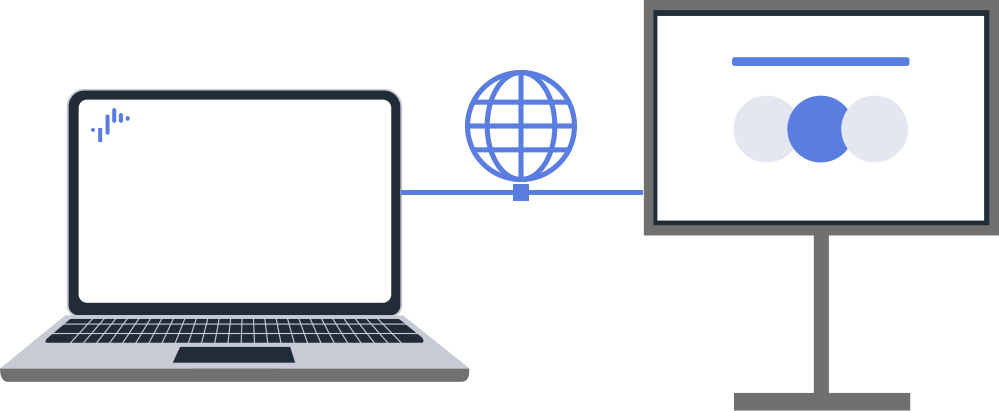
- Connect computer and monitor to the same network.
- Both wired and wireless LANs are supported.
Required Monitor Settings
Required Monitor Settings
Enable Remote Device Control
Procedure: [Settings] → [Network & Internet]→[Remote device settings]→[Control remothely]
Enable Simple IP Control
Procedure: [Settings] → [Network & Internet]→[Home network]→[IP control]→[Simple IP control]
Note:
EU area models have 3 types of specifications based on RED-DA compliance. Settings and available commands differ for each specification.
See details [IP Control].
How to Control the Monitor from Linux (Using netcat)
The protocol data format is 24 bytes of fixed-size data. The following is a simple example showing how TCP data can be easily transmitted to communicate with the monitor using the netcat command on Linux.
Example for Netcat Command on Linux to Communicate with Monitor
Connect to the Monitor
Connect to the monitor IP address and TCP port 20060, and be ready to send commands directly.
$ netcat [IP address] 20060
For Power OFF Operation
Command Request
It has a fixed length of 24 bytes and is structured as follows:
*SCPOWR0000000000000000
Response:
*SAPOWR0000000000000000 *SNPOWR0000000000000000
Meaning of Each Part
SAPOWR… Accepts the Power Off command.
SNPOWR… The current power status is OFF.
Data Format
The messages used by Simple IP Control are fixed-length data consisting of 24 bytes per command. The message consists of five parts:
| Byte Offset | Type | Byte Length | Value |
|---|---|---|---|
| 0-1 | Header | 2 | Byte[0] 0x2A [*]: (fixed) Byte[1] 0x53 [S]: (fixed) |
| 2 | Message Type | 1 | 0x43 [C]: Control 0x45 [E]: Enquiry 0x41 [A]: Answer 0x4E [N]: Notify |
| 3-6 | Command | 4 | |
| 7-22 | Parameters | 16 | |
| 23 | Footer | 1 | 0x0A [LF]: (fixed) |
Header
The message must begin with a fixed header (0x2A 0x53) that identifies it as a message.
Footer
Each message has a fixed footer (0x0A) that identifies the end of the message.
Message Types
| Message Type | Value | Message Direction | Description |
|---|---|---|---|
| Control | 0x43 [C] | Client to Monitor | Used to control or change values on the monitor.Answer message is used to reply. |
| Enquiry | 0x45 [E] | Client to Monitor | Used to enquire values on the monitor.Answer message is used to reply. |
| Answer | 0x41 [A] | Monitor to Client | Used to send a reply back to the client from the monitor. |
| Notify | 0x4E [N] | Monitor to Client | Used to send an event to the client from the monitor. |
Commands and Parameters
Each command is identified by four ASCII characters in Four-CC format and has parameters.
Common Parameters for each Message Type
The following table shows the common parameter definitions.
| Message Type (Byte[2]) | Parameter (Byte[7] – Byte[22]) | Description | |||||||||||||||
|---|---|---|---|---|---|---|---|---|---|---|---|---|---|---|---|---|---|
| C | # | # | # | # | # | # | # | # | # | # | # | # | # | # | # | # | Used for control with no parameters. e.g.) Toggle functions |
| E | # | # | # | # | # | # | # | # | # | # | # | # | # | # | # | # | Used for enquiries with no parameters. |
| A | 0 | 0 | 0 | 0 | 0 | 0 | 0 | 0 | 0 | 0 | 0 | 0 | 0 | 0 | 0 | 0 | Answer with success. e.g.) Control results |
| A | F | F | F | F | F | F | F | F | F | F | F | F | F | F | F | F | Answer with error. e.g.) Invalid parameters |
Simple IP control Commands
| Command Name | Message Type (Byte[2]) | FourCC (Byte[3] – Byte[6]) | Parameter (Byte[7] – Byte[22]) | Description | ||||||||||||||||||
|---|---|---|---|---|---|---|---|---|---|---|---|---|---|---|---|---|---|---|---|---|---|---|
| setIrccCode | C | I | R | C | C | X | X | X | X | X | X | X | X | X | X | X | X | X | X | X | X | Sends codes like IR commands of remote controller. Refer to IR Commands for the details. |
| A | 0 | 0 | 0 | 0 | 0 | 0 | 0 | 0 | 0 | 0 | 0 | 0 | 0 | 0 | 0 | 0 | Success | |||||
| A | F | F | F | F | F | F | F | F | F | F | F | F | F | F | F | F | Error | |||||
| setPowerStatus | C | P | O | W | R | 0 | 0 | 0 | 0 | 0 | 0 | 0 | 0 | 0 | 0 | 0 | 0 | 0 | 0 | 0 | 0 | Standby (Off) |
| C | 0 | 0 | 0 | 0 | 0 | 0 | 0 | 0 | 0 | 0 | 0 | 0 | 0 | 0 | 0 | 1 | Active (On) | |||||
| A | 0 | 0 | 0 | 0 | 0 | 0 | 0 | 0 | 0 | 0 | 0 | 0 | 0 | 0 | 0 | 0 | Success | |||||
| A | F | F | F | F | F | F | F | F | F | F | F | F | F | F | F | F | Error | |||||
| getPowerStatus | E | P | O | W | R | # | # | # | # | # | # | # | # | # | # | # | # | # | # | # | # | |
| A | 0 | 0 | 0 | 0 | 0 | 0 | 0 | 0 | 0 | 0 | 0 | 0 | 0 | 0 | 0 | 0 | Standby (Off) | |||||
| A | 0 | 0 | 0 | 0 | 0 | 0 | 0 | 0 | 0 | 0 | 0 | 0 | 0 | 0 | 0 | 1 | Active (On) | |||||
| A | F | F | F | F | F | F | F | F | F | F | F | F | F | F | F | F | Error | |||||
| togglePowerStatus | C | T | P | O | W | # | # | # | # | # | # | # | # | # | # | # | # | # | # | # | # | Toggles the power status |
| A | 0 | 0 | 0 | 0 | 0 | 0 | 0 | 0 | 0 | 0 | 0 | 0 | 0 | 0 | 0 | 0 | Success | |||||
| A | F | F | F | F | F | F | F | F | F | F | F | F | F | F | F | F | Error | |||||
| setAudioVolume | C | V | O | L | U | X | X | X | X | X | X | X | X | X | X | X | X | X | X | X | X | Set the volume value in the decimal digit pad on the left with “0”. e.g.) 0000000000000029 |
| A | 0 | 0 | 0 | 0 | 0 | 0 | 0 | 0 | 0 | 0 | 0 | 0 | 0 | 0 | 0 | 0 | Success | |||||
| A | F | F | F | F | F | F | F | F | F | F | F | F | F | F | F | F | Error | |||||
| getAudioVolume | E | V | O | L | U | # | # | # | # | # | # | # | # | # | # | # | # | # | # | # | # | Retrieves the audio volume value. |
| A | X | X | X | X | X | X | X | X | X | X | X | X | X | X | X | X | Success with volume value. | |||||
| A | F | F | F | F | F | F | F | F | F | F | F | F | F | F | F | F | Error | |||||
| setAudioMute | C | A | M | U | T | 0 | 0 | 0 | 0 | 0 | 0 | 0 | 0 | 0 | 0 | 0 | 0 | 0 | 0 | 0 | 0 | Unmute |
| C | 0 | 0 | 0 | 0 | 0 | 0 | 0 | 0 | 0 | 0 | 0 | 0 | 0 | 0 | 0 | 1 | Mute | |||||
| A | 0 | 0 | 0 | 0 | 0 | 0 | 0 | 0 | 0 | 0 | 0 | 0 | 0 | 0 | 0 | 0 | Success | |||||
| A | F | F | F | F | F | F | F | F | F | F | F | F | F | F | F | F | Error | |||||
| getAudioMute | E | A | M | U | T | # | # | # | # | # | # | # | # | # | # | # | # | # | # | # | # | Retrieves the audio mute status |
| A | 0 | 0 | 0 | 0 | 0 | 0 | 0 | 0 | 0 | 0 | 0 | 0 | 0 | 0 | 0 | 0 | Not Muted | |||||
| A | 0 | 0 | 0 | 0 | 0 | 0 | 0 | 0 | 0 | 0 | 0 | 0 | 0 | 0 | 0 | 1 | Muted | |||||
| A | F | F | F | F | F | F | F | F | F | F | F | F | F | F | F | F | Error | |||||
| setInput | C | I | N | P | T | 0 | 0 | 0 | 0 | 0 | 0 | 0 | 1 | 0 | 0 | 0 | 0 | X | X | X | X | Changes the input to HDMI (1–9999) |
| C | 0 | 0 | 0 | 0 | 0 | 0 | 0 | 3 | 0 | 0 | 0 | 0 | X | X | X | X | Changes the input to Composite (1–9999) | |||||
| C | 0 | 0 | 0 | 0 | 0 | 0 | 0 | 4 | 0 | 0 | 0 | 0 | X | X | X | X | Changes the input to Component (1–9999) | |||||
| C | 0 | 0 | 0 | 0 | 0 | 0 | 0 | 5 | 0 | 0 | 0 | 0 | X | X | X | X | Changes the input to Screen Mirroring (1–9999) | |||||
| A | N | N | N | N | N | N | N | N | N | N | N | N | N | N | N | N | Not Found | |||||
| A | 0 | 0 | 0 | 0 | 0 | 0 | 0 | 0 | 0 | 0 | 0 | 0 | 0 | 0 | 0 | 0 | Success | |||||
| A | F | F | F | F | F | F | F | F | F | F | F | F | F | F | F | F | Error | |||||
| getInput | E | I | N | P | T | # | # | # | # | # | # | # | # | # | # | # | # | # | # | # | # | Get current input |
| A | 0 | 0 | 0 | 0 | 0 | 0 | 0 | 1 | 0 | 0 | 0 | 0 | X | X | X | X | HDMI (1–9999) | |||||
| A | 0 | 0 | 0 | 0 | 0 | 0 | 0 | 3 | 0 | 0 | 0 | 0 | X | X | X | X | Composite (1–9999) | |||||
| A | 0 | 0 | 0 | 0 | 0 | 0 | 0 | 4 | 0 | 0 | 0 | 0 | X | X | X | X | Component (1–9999) | |||||
| A | 0 | 0 | 0 | 0 | 0 | 0 | 0 | 5 | 0 | 0 | 0 | 0 | X | X | X | X | Screen Mirroring (1–9999) | |||||
| setPictureMute | C | P | M | U | T | 0 | 0 | 0 | 0 | 0 | 0 | 0 | 0 | 0 | 0 | 0 | 0 | 0 | 0 | 0 | 0 | Disables the picture mute state. |
| C | 0 | 0 | 0 | 0 | 0 | 0 | 0 | 0 | 0 | 0 | 0 | 0 | 0 | 0 | 0 | 1 | Turns the screen black (picture mute). | |||||
| A | 0 | 0 | 0 | 0 | 0 | 0 | 0 | 0 | 0 | 0 | 0 | 0 | 0 | 0 | 0 | 0 | Success | |||||
| A | F | F | F | F | F | F | F | F | F | F | F | F | F | F | F | F | Error | |||||
| getPictureMute | E | P | M | U | T | # | # | # | # | # | # | # | # | # | # | # | # | # | # | # | # | Checks if picture mute is enabled |
| A | 0 | 0 | 0 | 0 | 0 | 0 | 0 | 0 | 0 | 0 | 0 | 0 | 0 | 0 | 0 | 0 | Disabled (Picture mute off) | |||||
| A | 0 | 0 | 0 | 0 | 0 | 0 | 0 | 0 | 0 | 0 | 0 | 0 | 0 | 0 | 0 | 1 | Enabled (Picture mute on) | |||||
| A | F | F | F | F | F | F | F | F | F | F | F | F | F | F | F | F | Error | |||||
| togglePictureMute | C | T | P | M | U | # | # | # | # | # | # | # | # | # | # | # | # | # | # | # | # | Toggles picture mode |
| A | 0 | 0 | 0 | 0 | 0 | 0 | 0 | 0 | 0 | 0 | 0 | 0 | 0 | 0 | 0 | 0 | Success | |||||
| A | F | F | F | F | F | F | F | F | F | F | F | F | F | F | F | F | Error | |||||
| setSceneSetting BZ40P / BZ35P / BZ30P: not supported. | C | S | C | E | N | X | X | X | X | X | X | X | X | X | X | X | X | X | X | X | X | Changes the Scene Setting. — auto — auto24pSync — general The parameter strings are case-sensitive and pad on the right with “#”. e.g.) auto24pSync##### |
| A | 0 | 0 | 0 | 0 | 0 | 0 | 0 | 0 | 0 | 0 | 0 | 0 | 0 | 0 | 0 | 0 | Success | |||||
| A | N | N | N | N | N | N | N | N | N | N | N | N | N | N | N | N | Not available for the current input. | |||||
| A | F | F | F | F | F | F | F | F | F | F | F | F | F | F | F | F | Error | |||||
| getSceneSetting BZ40P / BZ35P / BZ30P: not supported. | E | S | C | E | N | # | # | # | # | # | # | # | # | # | # | # | # | # | # | # | # | Retrieves the current Scene Setting. |
| A | X | X | X | X | X | X | X | X | X | X | X | X | X | X | X | X | Success with Scene Setting value. | |||||
| A | N | N | N | N | N | N | N | N | N | N | N | N | N | N | N | N | Not available for the current input. | |||||
| A | F | F | F | F | F | F | F | F | F | F | F | F | F | F | F | F | Error | |||||
| firePowerChange | N | P | O | W | R | 0 | 0 | 0 | 0 | 0 | 0 | 0 | 0 | 0 | 0 | 0 | 0 | 0 | 0 | 0 | 0 | Sent when powering off. |
| N | 0 | 0 | 0 | 0 | 0 | 0 | 0 | 0 | 0 | 0 | 0 | 0 | 0 | 0 | 0 | 1 | Sent when powering on. | |||||
| fireInputChange | N | I | N | P | T | 0 | 0 | 0 | 0 | 0 | 0 | 0 | 0 | 0 | 0 | 0 | 0 | 0 | 0 | 0 | 0 | Sent when input change to monitor happens |
| N | 0 | 0 | 0 | 0 | 0 | 0 | 0 | 1 | 0 | 0 | 0 | 0 | X | X | X | X | HDMI (1–9999) | |||||
| N | 0 | 0 | 0 | 0 | 0 | 0 | 0 | 3 | 0 | 0 | 0 | 0 | X | X | X | X | Composite (1–9999) | |||||
| N | 0 | 0 | 0 | 0 | 0 | 0 | 0 | 4 | 0 | 0 | 0 | 0 | X | X | X | X | Component (1–9999) | |||||
| N | 0 | 0 | 0 | 0 | 0 | 0 | 0 | 5 | 0 | 0 | 0 | 0 | X | X | X | X | Screen Mirroring (1–9999) | |||||
| fireVolumeChange | N | V | O | L | U | X | X | X | X | X | X | X | X | X | X | X | X | X | X | X | X | Sent when volume change. |
| fireMuteChange | N | A | M | U | T | 0 | 0 | 0 | 0 | 0 | 0 | 0 | 0 | 0 | 0 | 0 | 0 | 0 | 0 | 0 | 0 | Sent when unmuting. |
| N | 0 | 0 | 0 | 0 | 0 | 0 | 0 | 0 | 0 | 0 | 0 | 0 | 0 | 0 | 0 | 1 | Sent when muting. | |||||
| firePicture MuteChange | N | P | M | U | T | 0 | 0 | 0 | 0 | 0 | 0 | 0 | 0 | 0 | 0 | 0 | 0 | 0 | 0 | 0 | 0 | Sent when picture mute is enabled. |
| N | 0 | 0 | 0 | 0 | 0 | 0 | 0 | 0 | 0 | 0 | 0 | 0 | 0 | 0 | 0 | 1 | Sent when picture mute is disabled. | |||||
| getBroadcastAddress* | E | B | A | D | R | e | t | h | 0 | # | # | # | # | # | # | # | # | # | # | # | # | Retrieves the broadcast IPv4 address of the specified interface. |
| A | 1 | 9 | 2 | . | 1 | 6 | 8 | . | 0 | . | 1 | 4 | # | # | # | # | Broadcast address pad on the right with “#”. | |||||
| A | F | F | F | F | F | F | F | F | F | F | F | F | F | F | F | F | Error | |||||
| getMacAddress* | E | M | A | D | R | e | t | h | 0 | # | # | # | # | # | # | # | # | # | # | # | # | Retrieves the MAC address of the specified interface. |
| A | X | X | X | X | X | X | X | X | X | X | X | X | # | # | # | # | MAC address pad on the right with “#”. | |||||
| A | F | F | F | F | F | F | F | F | F | F | F | F | F | F | F | F | Error | |||||
* EU models Note:
EU area models have 3 types of specifications based on RED-DA compliance. Settings and available commands differ for each specification.
See details [IP Control].
IR Commands
IR commands such as control commands are supported on setIrccCode defined above. The supported codes and their parameters are defined below.
| IR Commands | Parameter (Byte[7] – Byte[22]) | |||||||||||||||
|---|---|---|---|---|---|---|---|---|---|---|---|---|---|---|---|---|
| Display | 0 | 0 | 0 | 0 | 0 | 0 | 0 | 0 | 0 | 0 | 0 | 0 | 0 | 0 | 0 | 5 |
| Home | 0 | 0 | 0 | 0 | 0 | 0 | 0 | 0 | 0 | 0 | 0 | 0 | 0 | 0 | 0 | 6 |
| Options | 0 | 0 | 0 | 0 | 0 | 0 | 0 | 0 | 0 | 0 | 0 | 0 | 0 | 0 | 0 | 7 |
| Return | 0 | 0 | 0 | 0 | 0 | 0 | 0 | 0 | 0 | 0 | 0 | 0 | 0 | 0 | 0 | 8 |
| Up | 0 | 0 | 0 | 0 | 0 | 0 | 0 | 0 | 0 | 0 | 0 | 0 | 0 | 0 | 0 | 9 |
| Down | 0 | 0 | 0 | 0 | 0 | 0 | 0 | 0 | 0 | 0 | 0 | 0 | 0 | 0 | 1 | 0 |
| Right | 0 | 0 | 0 | 0 | 0 | 0 | 0 | 0 | 0 | 0 | 0 | 0 | 0 | 0 | 1 | 1 |
| Left | 0 | 0 | 0 | 0 | 0 | 0 | 0 | 0 | 0 | 0 | 0 | 0 | 0 | 0 | 1 | 2 |
| Confirm | 0 | 0 | 0 | 0 | 0 | 0 | 0 | 0 | 0 | 0 | 0 | 0 | 0 | 0 | 1 | 3 |
| Red | 0 | 0 | 0 | 0 | 0 | 0 | 0 | 0 | 0 | 0 | 0 | 0 | 0 | 0 | 1 | 4 |
| Green | 0 | 0 | 0 | 0 | 0 | 0 | 0 | 0 | 0 | 0 | 0 | 0 | 0 | 0 | 1 | 5 |
| Yellow | 0 | 0 | 0 | 0 | 0 | 0 | 0 | 0 | 0 | 0 | 0 | 0 | 0 | 0 | 1 | 6 |
| Blue | 0 | 0 | 0 | 0 | 0 | 0 | 0 | 0 | 0 | 0 | 0 | 0 | 0 | 0 | 1 | 7 |
| Num1 | 0 | 0 | 0 | 0 | 0 | 0 | 0 | 0 | 0 | 0 | 0 | 0 | 0 | 0 | 1 | 8 |
| Num2 | 0 | 0 | 0 | 0 | 0 | 0 | 0 | 0 | 0 | 0 | 0 | 0 | 0 | 0 | 1 | 9 |
| Num3 | 0 | 0 | 0 | 0 | 0 | 0 | 0 | 0 | 0 | 0 | 0 | 0 | 0 | 0 | 2 | 0 |
| Num4 | 0 | 0 | 0 | 0 | 0 | 0 | 0 | 0 | 0 | 0 | 0 | 0 | 0 | 0 | 2 | 1 |
| Num5 | 0 | 0 | 0 | 0 | 0 | 0 | 0 | 0 | 0 | 0 | 0 | 0 | 0 | 0 | 2 | 2 |
| Num6 | 0 | 0 | 0 | 0 | 0 | 0 | 0 | 0 | 0 | 0 | 0 | 0 | 0 | 0 | 2 | 3 |
| Num7 | 0 | 0 | 0 | 0 | 0 | 0 | 0 | 0 | 0 | 0 | 0 | 0 | 0 | 0 | 2 | 4 |
| Num8 | 0 | 0 | 0 | 0 | 0 | 0 | 0 | 0 | 0 | 0 | 0 | 0 | 0 | 0 | 2 | 5 |
| Num9 | 0 | 0 | 0 | 0 | 0 | 0 | 0 | 0 | 0 | 0 | 0 | 0 | 0 | 0 | 2 | 6 |
| Num0 | 0 | 0 | 0 | 0 | 0 | 0 | 0 | 0 | 0 | 0 | 0 | 0 | 0 | 0 | 2 | 7 |
| Volume Up | 0 | 0 | 0 | 0 | 0 | 0 | 0 | 0 | 0 | 0 | 0 | 0 | 0 | 0 | 3 | 0 |
| Volume Down | 0 | 0 | 0 | 0 | 0 | 0 | 0 | 0 | 0 | 0 | 0 | 0 | 0 | 0 | 3 | 1 |
| Mute | 0 | 0 | 0 | 0 | 0 | 0 | 0 | 0 | 0 | 0 | 0 | 0 | 0 | 0 | 3 | 2 |
| Channel Up | 0 | 0 | 0 | 0 | 0 | 0 | 0 | 0 | 0 | 0 | 0 | 0 | 0 | 0 | 3 | 3 |
| Channel Down | 0 | 0 | 0 | 0 | 0 | 0 | 0 | 0 | 0 | 0 | 0 | 0 | 0 | 0 | 3 | 4 |
| Subtitle | 0 | 0 | 0 | 0 | 0 | 0 | 0 | 0 | 0 | 0 | 0 | 0 | 0 | 0 | 3 | 5 |
| DOT | 0 | 0 | 0 | 0 | 0 | 0 | 0 | 0 | 0 | 0 | 0 | 0 | 0 | 0 | 3 | 8 |
| Picture Off | 0 | 0 | 0 | 0 | 0 | 0 | 0 | 0 | 0 | 0 | 0 | 0 | 0 | 0 | 5 | 0 |
| Wide | 0 | 0 | 0 | 0 | 0 | 0 | 0 | 0 | 0 | 0 | 0 | 0 | 0 | 0 | 6 | 1 |
| Jump | 0 | 0 | 0 | 0 | 0 | 0 | 0 | 0 | 0 | 0 | 0 | 0 | 0 | 0 | 6 | 2 |
| Sync Menu | 0 | 0 | 0 | 0 | 0 | 0 | 0 | 0 | 0 | 0 | 0 | 0 | 0 | 0 | 7 | 6 |
| Forward | 0 | 0 | 0 | 0 | 0 | 0 | 0 | 0 | 0 | 0 | 0 | 0 | 0 | 0 | 7 | 7 |
| Play | 0 | 0 | 0 | 0 | 0 | 0 | 0 | 0 | 0 | 0 | 0 | 0 | 0 | 0 | 7 | 8 |
| Rewind | 0 | 0 | 0 | 0 | 0 | 0 | 0 | 0 | 0 | 0 | 0 | 0 | 0 | 0 | 7 | 9 |
| Prev | 0 | 0 | 0 | 0 | 0 | 0 | 0 | 0 | 0 | 0 | 0 | 0 | 0 | 0 | 8 | 0 |
| Stop | 0 | 0 | 0 | 0 | 0 | 0 | 0 | 0 | 0 | 0 | 0 | 0 | 0 | 0 | 8 | 1 |
| Next | 0 | 0 | 0 | 0 | 0 | 0 | 0 | 0 | 0 | 0 | 0 | 0 | 0 | 0 | 8 | 2 |
| Pause | 0 | 0 | 0 | 0 | 0 | 0 | 0 | 0 | 0 | 0 | 0 | 0 | 0 | 0 | 8 | 4 |
| Flash Plus | 0 | 0 | 0 | 0 | 0 | 0 | 0 | 0 | 0 | 0 | 0 | 0 | 0 | 0 | 8 | 6 |
| Flash Minus | 0 | 0 | 0 | 0 | 0 | 0 | 0 | 0 | 0 | 0 | 0 | 0 | 0 | 0 | 8 | 7 |
| TV Power | 0 | 0 | 0 | 0 | 0 | 0 | 0 | 0 | 0 | 0 | 0 | 0 | 0 | 0 | 9 | 8 |
| Audio | 0 | 0 | 0 | 0 | 0 | 0 | 0 | 0 | 0 | 0 | 0 | 0 | 0 | 0 | 9 | 9 |
| Input | 0 | 0 | 0 | 0 | 0 | 0 | 0 | 0 | 0 | 0 | 0 | 0 | 0 | 1 | 0 | 1 |
| Sleep | 0 | 0 | 0 | 0 | 0 | 0 | 0 | 0 | 0 | 0 | 0 | 0 | 0 | 1 | 0 | 4 |
| Sleep Timer | 0 | 0 | 0 | 0 | 0 | 0 | 0 | 0 | 0 | 0 | 0 | 0 | 0 | 1 | 0 | 5 |
| Video 2 | 0 | 0 | 0 | 0 | 0 | 0 | 0 | 0 | 0 | 0 | 0 | 0 | 0 | 1 | 0 | 8 |
| Picture Mode | 0 | 0 | 0 | 0 | 0 | 0 | 0 | 0 | 0 | 0 | 0 | 0 | 0 | 1 | 1 | 0 |
| Demo Surround | 0 | 0 | 0 | 0 | 0 | 0 | 0 | 0 | 0 | 0 | 0 | 0 | 0 | 1 | 2 | 1 |
| HDMI 1 | 0 | 0 | 0 | 0 | 0 | 0 | 0 | 0 | 0 | 0 | 0 | 0 | 0 | 1 | 2 | 4 |
| HDMI 2 | 0 | 0 | 0 | 0 | 0 | 0 | 0 | 0 | 0 | 0 | 0 | 0 | 0 | 1 | 2 | 5 |
| HDMI 3 | 0 | 0 | 0 | 0 | 0 | 0 | 0 | 0 | 0 | 0 | 0 | 0 | 0 | 1 | 2 | 6 |
| HDMI 4 | 0 | 0 | 0 | 0 | 0 | 0 | 0 | 0 | 0 | 0 | 0 | 0 | 0 | 1 | 2 | 7 |
| Action Menu | 0 | 0 | 0 | 0 | 0 | 0 | 0 | 0 | 0 | 0 | 0 | 0 | 0 | 1 | 2 | 9 |
| Help | 0 | 0 | 0 | 0 | 0 | 0 | 0 | 0 | 0 | 0 | 0 | 0 | 0 | 1 | 3 | 0 |