

EU model [IP control] specifications
EU models have three specification types. See the first item in [IP control] list to identify.
Procedure: [Settings] → [Network and Internet] → [IP control]
[Authentication] at the Top
![IP Control screen showing [Authentication] at the top](/wp-content/uploads/2025/12/5-001-1-1200x671.jpg)
Items in [IP control]
- Authentication
- Pre-Shared Key
- Simple IP control
- Control4®
Settings Items and Specifications Details
Note:
In this case, communication method is fixed to HTTP.
[Authentication]
You can select an authentication method for API access. It can prevent unauthorized access and enhance security. Typically, use [Pre-Shared Key] for commercial displays and [None] for managed networks. The following methods are available.
Option (authentication method)
- [None]
APIs are available regardless of authentication level (None / Generic / Private) without authentication method. - [Normal]
Pre-shared key (a user-defined secret key for authentication method) is not required, but only authentication level None APIs are available. - [Pre-Shared Key]
Authentication method uses a Pre-shared key. APIs of authentication level Generic / Private are available by setting a Pre-shared key. APIs of authentication level None are also available without authentication method. - [Normal and Pre-Shared Key]
Either [Normal] or [Pre-Shared Key] authentication method can be used.
Tips:
When the client does not support authentication method selection, Pre-Shared Key is commonly used. In this case, configure the key from the [Pre-Shared Key] settings.
[Pre-Shared Key]
When [Authentication] is set to either [Pre-shared key] or [Normal and Pre-shared key], you can configure the key.
[Simple IP control]
Simple IP Control is a TCP-based SSIP (BRAVIA Professional Displays proprietary protocol). Used to remotely control the display over the local network.
For details on Simple IP Control, see here.
[Control4®]
BRAVIA Professional Displays are compatible with the integrated control platform “Control4®,” enabling monitor operation from the system and integration with other smart home devices. Enable this setting when using.
[Root certificate] at the Top
![IP Control screen showing [Root certificate] at the top](/wp-content/uploads/2025/12/5-002-1200x671.jpg)
Items in [IP control]
- Root certificate
- Pre-Shared Key
- Simple IP control
- Control4®
Settings Items and Specifications Details
Note:
- Due to RED-DA regulations, communication method is fixed to HTTPS.
- Due to RED-DA requirements, [Control Remotely] is OFF by default.
Set to ON to enable IP control. This setting is required even for same-device control.
Services requiring [Control Remotely] ON
Simple IP control, IP Remote, Display Management, Control@4, AMX, Crestron XIO
Procedure: [Settings]→[Network & Internet]→[Remote device settings]→[Control Remotely]
Even after updating Firmware PKG (v6.8100, Android TV OS 12) after July 2025, setting values remain unchanged.
Pre-update values are applied as-is.
[Root certificate]
You can check the root certificate information.
Example: [Issuer name] [Organization name] [Certificate authority] [SHA256 fingerprint]
[Pre-Shared Key]
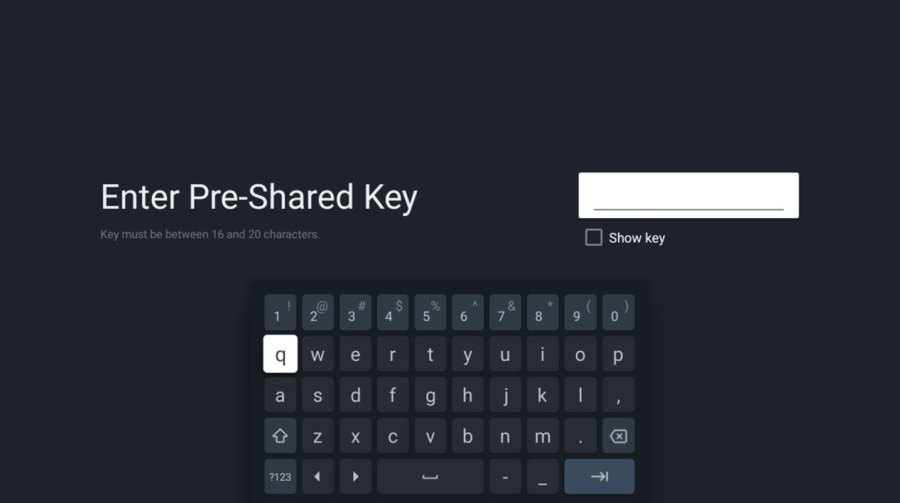
When [Pre-Shared Key] is enabled, the Key settings screen appears. Specify the Key with 16 to 20 characters.
[Simple IP Control]
Simple IP Control is a TCP-based SSIP (BRAVIA Professional Displays proprietary protocol). Used to remotely control the display over the local network.
Note:
The following APIs are not available. For details, refer to Simple IP control.
- getBroadcastAddress
- getMacAddress
[Control4®]
BRAVIA Professional Displays are compatible with the integrated control platform “Control4®,” enabling monitor operation from the system and integration with other smart home devices. Enable this setting when using.
[Communication mode] at the Top
![IP Control screen showing [Communication mode] at the top](/wp-content/uploads/2025/12/5-004-1200x671.jpg)
Items in [IP control]
- Communication mode
- Authentication
- Root certificate
- Pre-Shared Key
- Simple IP control
- Control4®
Settings Items and Specifications Details
[Communication mode]
You can select the communication method from HTTP/HTTPS.
Note:
Switching to HTTPS communication is only required when the display communicates with external PCs or servers. For internal device communication using REST API, HTTP communication continues to be used even after RED-DA compliance.。
[Root certificate]
You can check the root certificate information.
Example: [Issuer name] [Organization name] [Certificate authority] [SHA256 fingerprint]
[Authentication]
You can select an authentication method for API access. It can prevent unauthorized access and enhance security. Typically, use [Pre-Shared Key] for commercial displays and [None] for managed networks. The following methods are available.
Option (authentication method)
- [None]
APIs are available regardless of authentication level (None / Generic / Private) without authentication method. - [Normal]
Pre-shared key (a user-defined secret key for authentication method) is not required, but only authentication level None APIs are available. - [Pre-Shared Key]
Authentication method uses a Pre-shared key. APIs of authentication level Generic / Private are available. APIs of authentication level None are also available without authentication method. - [Normal and Pre-Shared Key]
Either [Normal] or [Pre-Shared Key] authentication method can be used.
Tips:
When the client does not support authentication method selection, Pre-Shared Key is commonly used. In this case, configure the key from the [Pre-Shared Key] settings.
[Pre-Shared Key]
When [Authentication] is set to either [Pre-shared key] or [Normal and Pre-shared key], you can configure the key.
[Simple IP control]
Simple IP Control is a TCP-based SSIP (BRAVIA Professional Displays proprietary protocol). Used to remotely control the display over the local network.
[Control4®]
BRAVIA Professional Displays are compatible with the integrated control platform “Control4®,” enabling monitor operation from the system and integration with other smart home devices. Enable this setting when using.
HTTPS Connection Setup
To use HTTPS connections, device configuration and certificate installation on the client PC are required.

Export root certificate
- Insert a USB device into the monitor.
- Open the [IP control].
Procedure: [Settings]→[Network & Internet]→[Local network]→[IP control]→ [Root certificate]
The root certificate will be exported to the USB device. - Import the root certificate to the client PC.
Settings
- Select the HTTPS.
・Models with [Root Certificate] displayed at the top use fixed HTTPS, so NO [Communication Mode] setting is required.
・If the model has a [Communication mode] setting, set it to HTTPS. - Configure [Pre-Shared Key]
- Set [Simple IP Control] to ON.
- Confirm the client PC can reach the monitor on port 443.
Network Connection
Tips:
This section describes how to check the connection using the REST API.
When using a tool, select the appropriate version (IPv4 or IPv6).
- Connect the monitor to network.
- Confirm the monitor has IP address.
Procedure: [Settings]→[Network & Internet] - Record the IP address (Example: 192.168.1.121)
- Use the REST API getSystemInformation and verify that the recorded IP address appears in the response.