

BRAVIA WebControl UI

BRAVIA Web Control UI is a management tool that enables configuration changes and status monitoring via a web browser connected to the same network as the display. Monitor status in real-time and manage operations remotely.
Features
Control via Web Browser
You can set and operate the monitor via a web browser. Monitors* on the same network can be managed by devices such as PCs and tablets.
*Manages monitors one at a time.
Intuitive and Easy-to-Navigate GUI
Intuitive screen configuration makes complex settings simple, improving work efficiency from installation to operation and maintenance.
Configure Settings in Pro Mode Environment
Even in “Pro mode” environment where operations are restricted, display settings can be changed via a web browser.
Required monitor settings
Set Administrator Password
Use the “Admin Password” from “Pro settings” as the login password for the BRAVIA Web Control UI.
Procedure: [Pro settings]→[Admin password]
Check IP Address
Check “Monitor settings.” This is required to access the BRAVIA Web Control UI. Please write it down.
Procedure: [Settings]→[System]→[About]→[Device name]
Enable BRAVIA Web Control UI
Select the BRAVIA Web Control UI from the list of [Launch services] under “Pro settings.” Follow the instructions to restart and activate the monitor.
Preparation
1. Connect to Network
Connect the device that operates the BRAVIA Web Control UI, such as a PC or tablet, to the same network as the monitor.
Supported Browsers
PC: Google Chrome、Microsoft Edge*、Safari
Mobile: Google Chrome、Safari
* Microsoft Edge is available only when digest in AuthSchemes of the HTTP authentication scheme in Microsoft Edge policy is enabled.
For details, refer to
Microsoft Edge policies
.
2. Login with browser
Access http://<Monitor's IP address>/sony/webui/ on your device and the login screen will be displayed. Enter the username and password and the web management screen will be displayed.
Login Information
User name: admin
Password: Password set with [Admin password]of Pro settings.
How to Use
The BRAVIA Web Control UI allows you to remotely control the monitor from the web management screen, when the monitor is powered on.
Note:
- Do not turn on/off the monitor or operate the remote control while accessing the web management screen.
- Use it in a network environment with appropriate security measures in place.
Using the Web Management Screen
*The GUI is subject to change without prior notice.
To navigate the web management screen, select an item in the sidebar.

About Each Screen in the Web Management Tool
You can check the monitor’s model name, ID, software version and network information. Click the icon next to each item to copy its value to the clipboard.
Items You Can Check
- Equipment information
Equipment name, model name, serial number, and equipment ID - Monitor software version
Monitor software, Android, WebAppRuntime, etc. - Network Status
IP address, MAC address

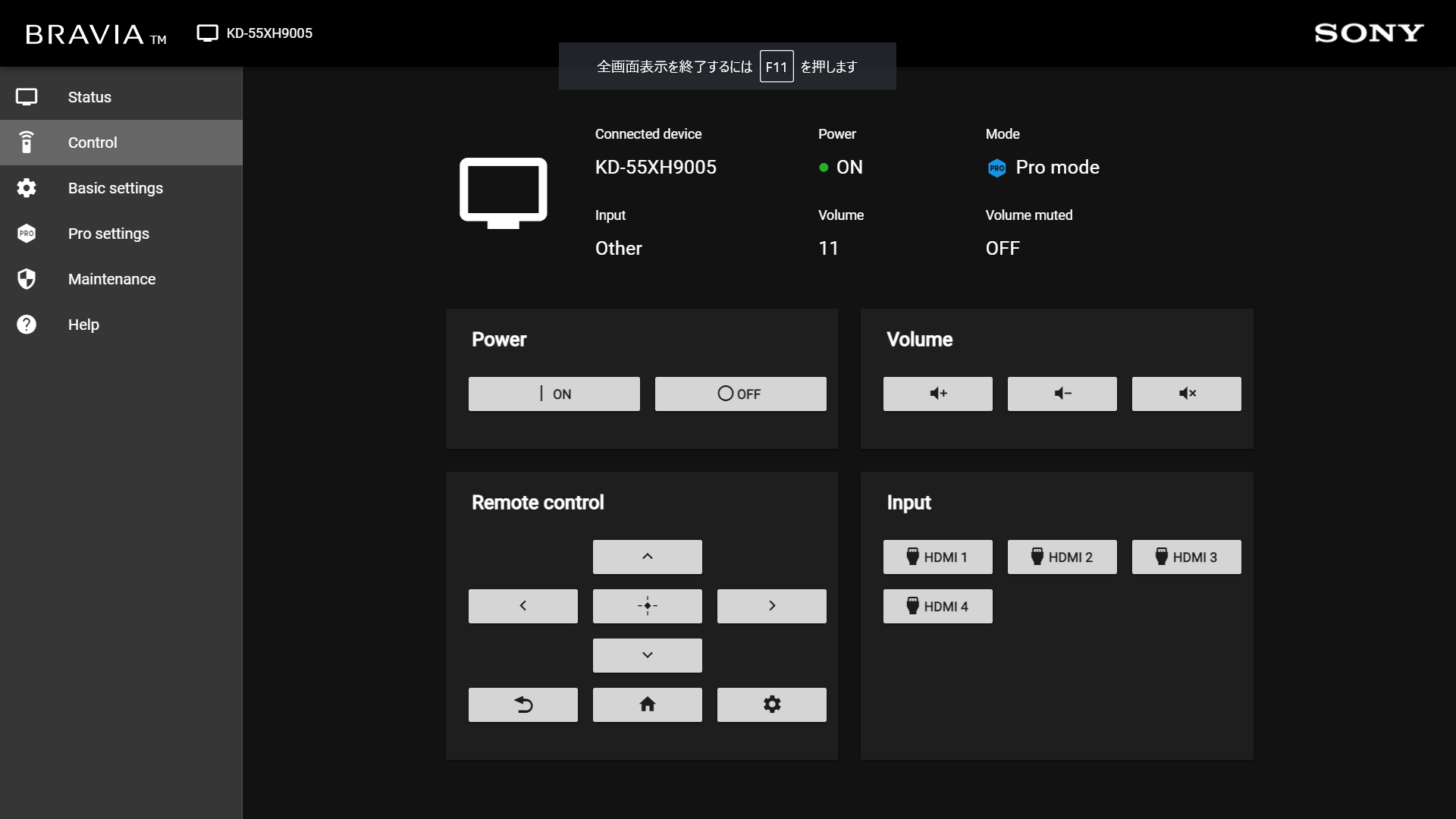
You can turn the power on/off, switch inputs, and perform remote control operations.
Items You Can Check
- Power ON/OFF
- Remote control operation (cursor movement, [Enter], [Back], [Home], [Quick Settings] buttons)
- ・Volume [+] [-], mute
- Input switching
On the basic settings screen and pro settings screen, you can check and change the monitor’s “Monitor settings” and “Pro settings.”
Procedure
- Change the settings and select [Apply].
- When the confirmation dialog appears, select [OK].
- “Applying …” appears and the dialog box disappears when the application is complete.

The following “Pro settings” functions/items are available via the BRAVIA Web Control UI:
Configurable “Pro Settings” Items
- Restarting the monitor
- Switching the operating environment to “Normal mode,” “Pro settings mode” and “Pro mode”
- Updating the monitor software
- Importing and exporting settings
There are two ways to import and export (copy) “Monitor settings” and “Pro settings.”
- Execute from the [Maintenance] page of the “BRAVIA Web Control UI” web management screen.
- Use a USB flash drive and the monitor’s “Pro settings” item.
These two methods can be used together, so choose whichever suits your environment.
How to Export
1.Exporting (Copying) Settings
Using the BRAVIA Web Control UI
- Open the web management screen of the source monitor and go to the [Maintenance] page.
- Select [Export] to download a ZIP file containing the settings.
Using a USB Drive
- Insert the USB flash drive into the monitor and execute [Copy settings] from the “Pro settings” menu.
Procedure: [Pro settings]→[Export settings] - When completed, a ZIP file will be saved to the USB drive.
2.Importing Settings via BRAVIA Web Control UI
Using a File Collected from the Web Management Screen
- Open the web management screen of the destination monitor and go to the [Maintenance] page.
- Specify the downloaded ZIP file and run [Import].
Using Files Retrieved from a USB Flash Drive
Combine the following twos into a ZIP file.
- BraviaB2bSettings.json
- TvStackData_xxxxxxxxxxxx.zip(*File name includes date and time)
Specify the created ZIP file, open the web management screen of the destination monitor, go to the [Maintenance] page, and execute [Import].
3.Importing Settings via a USB Flash Drive
- Files exported using the BRAVIA Web Control UI cannot be used as import files on a USB flash drive.
- Execute [Copy settings] in the “Pro settings” menu of the source monitor to save the file saved on the USB flash drive as the import file to the destination monitor.
Procedure: [Pro settings]→[USB drive auto run]→[Import settings]