

Portrait Content Guide
Portrait content format varies by Android TV OS version.
Specifications
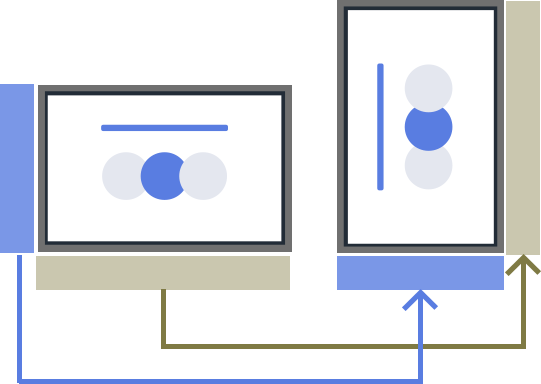
Portrait format (9:16) content is supported.
In portrait orientation, the left edge of landscape content (16:9) becomes the bottom of the screen. Create content in landscape format (16:9) even for portrait displays. See “02_cosmetic_portrait.jpg” in the sample folder’s media folder for reference.
BGM Notes
- BGM applies to the entire system and cannot be set per playlist.
- BGM plays only during still images and mutes automatically during video or HTML playback.
- Use one long track to cover still image playback. Multiple short tracks may cause brief interruptions when switching.
HTML
For AV format details, see here.